Glen's Thalamus tips
If you have any feedback, ideas for tips or need Thalamus assistance email thalamus.help@wellsouth.org.nz or glen.knol@wellsouth.org.nz.
You can also view video tutorials here.
Columns | WellSouth Practice Update – 22 October Whiringa-ā-nuku 2026
Sometimes the most useful things in life hide out in plain sight.
Columns, a pillar of roman construction (some pun intended), without which so much could not have been achieved. Likewise in Thalamus the updated columns functionality means different things to different people but provides a “sound foundation” for getting the most out of patient exports in any report.
I have been visiting practices and showed them Columns, and realised not everyone knew about this functionality, however it’s been updated further so now is a good time to let people know again ????!
So where do these mythical “Columns” things hide, I hear you say?
Well, when you view a patient list you will find this in the top right hand of the page:

Clicking on Columns brings you here, with Compact producing the basics and letting you choose the rest:

All is the usual export with everything included, None allows you to start from afresh and choose what you want. You can then print or export to Excel from there.
What are the benefits?
This allows you to print the patient export on one page (everyone likes that). Or put important markers together (Think high BP, but No BP meds next to each other), which helps see the bigger picture for the patient. They can also make your Excel spreadsheets more concise without having to remove the many columns you don’t need at the end.
Also, following on from my last tip about keeping patient details private, this is the point at which you can opt to remove the patient name if you want to export the list to excel.
So if you want to get the most out of Thalamus exports, try Columns, hopefully it will make using Thalamus so much nicer!
If you have any feedback, ideas for tips or need Thalamus assistance, please email me.
WellSouth Practice Update – 8 October Whiringa-ā-nuku 2026
Cybersecurity is top of mind at present.
It all ties together with the goal ultimately being improved patient privacy at the end of the day, so with that in mind, now is a good time to send out a reminder you about patient privacy. We have all sent an email to someone by mistake and wanted to retrieve it but can’t. At best it’s no real drama, no harm, no foul. However, what if that email contains patient identifiable information, then that’s a privacy breach, and none of us really wants that.
I still get people sending me emails about Thalamus queries that include a picture of a full patient record, or lists mentioning a patient’s name, or with something that might breach someone’s privacy buried deep in an email trail that has gone through a bunch of people.
However, should you need to tell us at Thalamus about a problem or question, apart from who you are and the practice you’re from, we just need an NHI, and a description of what problem is. If you send through NHI only information this effectively protects patient privacy. If we need to know more, then we can contact you, organise a time to remote in with Teamviewer, and have a wee look!
Best practice suggests we not send patient identifiable information via email, and if we make that very small change, then things will go so much better for everyone involved in the long run.
I think it’s time for that reminder again!
If you have any feedback, ideas for tips or need Thalamus assistance, please email me.
WellSouth Practice Update 24 September Mahuru 2026
In my visits out into the practices, one of the questions I get asked a lot is, why are there women who are over 70 on the Thalamus HPV screening lists?
Good question, thanks for asking!
They appear because they haven’t met the National Cervical Screening Programme (NCSP) register screening requirements to exit the programme.
Women are eligible until age 69 years, but screening is recommended from age 70-74 if they have been unscreened or under-screened before age 70 years; this includes:
-
Women who have not had an HPV Not Detected result, from age 65 years (or 67 years if immune-deficient)
-
Women who have not had 2 consecutive normal cytology results between ages 62-69
These people should be given another HPV test. Across our region, based on the NCSP register, that’s about 1252 people in this group.
all aware the recall systems aren’t always accurate, so recommend practices review those age 70-74 listed on Thalamus and check with this against the NCSP register to ensure they have the correct recall details.
If you have a question about Thalamus HPV screening or want hlp regarding cervical screening recalls or the revised cervical screening outcome codes, feel free to give me a bell glen.knol@wellsouth.org.nz, and we can have a chat.
WellSouth Practice Update 27 August - Ākuhata 2026
Perinodopril SQL
In last week’s newsletter we shared advice that from 1st September 2026 the current Coversyl formulation (perindopril erbumine) will be replaced by a new Coversyl formulation containing perindopril arginine. The recommendation was that all practices identify patients currently prescribed Coversyl 2 mg, 4 mg, or 8 mg to ensure that prescriptions are updated at the appropriate time.
I have a developed an SQL that can be run in MedTech that will tell you all the patients that have been prescribed Perindopril this year.
Should you want to use it, contact me and I will remote into your practice and help you run it: thalamus.help@wellsouth.org.nz
You can read about the Prescriber Update: Perindopril (Coversyl) formulation and strength changes here.
WellSouth Practice Update 13 August - Ākuhata 2026
Auditing made easy with the Cornerstone Audit
So where is this magical audit, you might ask? You can find the Cornerstone Continuous Quality Improvement for Diabetes under the Cornerstone Audit.
Produced by Dr Jennny Macdiarmid and the Thalamus team, you will find a full audit outline and step-by-step guidance to direct you through all the things you need to do to complete the audit, including the links to all the instructions you need to get it all done.
So, if you need to do an audit, why not try the Cornerstone Audit? Check out the Type 2 Diabetes Audit Package in Thalamus to get started.
WellSouth Update 23 July - Hōngongoi 2026
Print or view what you want
Lite view was the start of printing or viewing what you want. However, very recently the nice people that gave us Thalamus have allowed you to choose the columns you display when you view patients. To do this when you view patients look for a new box near the top right of the report called Columns
 and click on it.
This will bring up a list of all the columns in the report and some radio buttons for those columns, with an All or None option:

If you select None and start choosing which columns you want to display then that’s all you will see (and print), and the jobs a goodun as they say in the trade ????!
Find the 11 June tip on the Health Access Targets dashboard if you want to gage your practice performance against the Primary Care Health Target.
WellSouth Update 2 July - Hōngongoi 2026
New Diabetes Guidelines are now live
As of the 1st of July, the new diabetes guidelines criteria came into play.
Prioritisation is the key, when identifying and managing patients who newly meet diabetes criteria. The recommended approach is to prioritise using an equity lens — beginning with Pacific, Indo-Asian, and Māori patients, followed by those under 25 who require secondary care referral, those with unconfirmed diabetes who need a second test to confirm, then everyone else. The Diabetes dashboard structures the priorities to support this approach.
You can find the uncoded diabetes tab on the Diabetes Dashboard here.
WellSouth Update 11 June - Pipiri 2026
Health Access Targets Dashboard
Recently Thalamus included a dashboard for the Health Access Targets.
Since this dashboard has gone live we have had a few questions about the Access Target, mainly around not understanding the measure or its purpose.
Regarding the purpose of the target, Health New Zealand has decided that there should be a target linked to people’s ability to access general practice. As part of this, and in conjunction with a working group containing staff from primary care and PHOs, they have defined which appointments are counted in this target, and which aren’t. The report on Thalamus is only reporting the data based on those definitions and our interpretation of them.
The measure itself is clear, 80% of appointments have an access time of 7 or fewer days, where the access time is the number of calendar days between an appointment booked date and an appointment started date. For example, if an enrolled patient books a Friday appointment on Monday of the same week, then this appointment is counted. If they book an appointment more than 7 days from when the appointment is scheduled to take place, then it is not counted as having access within 7 days.
There are exclusions to which appointments and which staff members are counted, and you can read about them here (Te Whatu Ora, v1, May 2026). We are currently working with the Ministry to get more accurate data, so the current dashboard should be taken as preliminary and indicative only. Also, the data currently on the dashboard only looks at MedTech and Indici data, as we awaiting confirmation from Health New Zealand | Te Whatu Ora about the data sources for MyPractice, and Profile for Mac.
Finally, the Primary Care Health Target is not currently linked to performance payments (though this has not been ruled out, NZ Doctor June 2026), and the time frame for achieving the target of 80% of appointments booked within 7 days is 2030.
WellSouth Update 21 May - Mei 2026
Diabetes Tip
Some folks have asked me why we released the new Diabetes guidelines early in Thalamus. The answer is because some proactive practices wanted to get a head start and asked us to do it, and it was a good thing to do.
People have suggested that Thalamus has a lot of data, but what do we do with it?
So the recommended approach is, when identifying and managing patients who newly meet diabetes criteria, prioritise using an equity lens — beginning with Pacific, Indo-Asian, and Māori patients, followed by those under 25 who require secondary care referral, those with unconfirmed diabetes who need a second test to confirm, then everyone else (the dashboard structures the priorities to support this approach with more information obtained by Clicking on the see further information and prioritisation on the dashboard). You can find the new tab on the Diabetes Dashboard here.
WellSouth staff may be able to assist with recalling patients - please contact the WellSouth Māori & Pacific Island Navigator for more information. WellSouth also offers the Take Control of Diabetes programme (2-3 sessions) and the Walking Away (one two-hour session) pre-diabetes programme. These programmes are available both in person and online. Take Control of Your Diabetes covers the basics of diabetes management and include specialist advice from a dietitian and pharmacist, (referrals can be made through ERMS), more information and self-referral options can be found here.
Please note there is no compulsion to start the process before July, however, should you want to get a head start, July will roll around pretty quickly and there is no better time to start than now.
WellSouth Update – 9 April - Āperira 2026
CVD Form tips
I often get contacted by people who tell me this person is too young for a CVD risk assessment, or to ask why a funded CVD opportunity got rejected.
In the first scenario, further investigation reveals that the person had a severe mental health condition (Schizophrenia, Major depressive disorder, Bipolar disorder, Schizoaffective disorder) coded in the PMS and the age of eligibility for a CVDRA for people with severe MH condition starts at 25, meaning many younger people fall into this category.
For those rejected, it was usually because the assessment must be commenced as a new Non-Funded Assessment, and once severe mental illness is ticked, the claim will update to a funded Assessment. Turns out no one had ticked the box for severe mental illness in the CVD form when they submitted the claim for these people. Particular care needs to be given for the people who are eligible via a mental health condition only; in this cohort, 78% of people who are clinically eligible for a CVDRA do not have a current CVDRA.
Either way, you can get these people from the Cardiovascular Health Report by looking at the menu option called Mental Health > 25 and then View Patients, and it will give you everyone over 25 with a mental health condition.
As a support, how about having a chat with your Access and Support Team, to see if they can assist.
WellSouth Update – 19 March, Poutū-te-rangi, 2026
Workforce
Are you sick of compiling a spreadsheet with all the workforce changes to send to the PHO?
Well Thalamus has the answer for you, Workforce reporting is now managed directly in Thalamus — no spreadsheets, no doublehandling.
What’s in it for you:
-
Less admin: Update staffing details anytime, in one place.
-
Always accurate: No old versions or manual followups.
-
Better support: Uptodate workforce data helps us plan services and tailor support for your practice.
-
Future automation: This data will enable smoother onboarding and automated processes in the medium term.
Just review your Workforce form in Thalamus, make updates as people enter or leave your practice (rather than quarterly), and you’re done.
Any questions, contact your Practice Partner and they will come out and show you!
WellSouth Update – 5 March, Poutū-te-rangi, 2026
Maximising funded opportunities
On my travels around the practices, every now and then someone tells me the people they pull off the Opportunities Report to claim for get rejected, and they are not sure why?
A deeper dive into the why usually elicits one of the main reasons, in that the underlying data in the PMS doesn’t match the NES Register, and we report based on the NES register as that is what defines the practice’s capitation funded population.
Therefore, if a practice wants to maximise the funded opportunities in the Opportunities Report, the best way to do that is to make sure any Register Update discrepancies relating to funding (i.e. Quintile Funding and Ethnicity Audit differences) are all tickety boo. That way the possibility of rejections should be minimised.
WellSouth Update – 5 February, Huitanguru 2026
Coding your diabetes patients
Kia ora all,
I was helping someone do a diabetes audit recently, which made me look at the numbers of patients with diabetes that aren’t coded.
This numbered in the 1000s a few years ago for the whole PHO, and after some sterling work in the practices, we got it as low as 150 last year, however it is slowly creeping back up again.
According to a large retrospective study in the Canadian Medical Journal1, patient care can be improved if clinicians code a diagnosis of diabetes in an electronic health record (PMS). Patients with a coded diabetes diagnosis were more likely to receive quality-of-care indicators such as HbA1c testing, and blood pressure monitoring, compared with similar patients without a coded diagnosis.
Anecdotally I can see in the data that uncoded patients are less likely to have a current DAR, a diabetes recall, and more likely to not have a foot check or not be on diabetes medications in the last 4 months.
It’s easy to find out who these folk are, if you go to the Diabetes Dashboard and click on Uncoded Diabetic, then view patients.
Identification of undiagnosed diabetes and quality of diabetes care in the United States: cross-sectional study of 11.5 million primary care electronic records. Tim A. Holt Candace L. Gunnarsson Paul A. Cload and Susan D. Ross
Canadian Medical Association Open Access Journal Oct 2014, 2 (4) E248- E255; DOI: 10.9778/cmajo.20130095
If you want to know more, email glen.knol@wellsouth.org.nz
WellSouth Update –22 January, Kohitātea, 2026
Smoking Dashboard Coding
Kia ora all, welcome to 2026.
A practice contacted me the other day with a smoking query, and whilst answering that query, I noticed something interesting.
There were some patients that had gone from being coded as a current smoker to later coded as a non-smoker/never smoked. However, technically that’s not possible. Once someone has smoked, they should never be recorded as a non-smoker. They should be recorded as an ex-smoker.
If they are incorrectly coded as non-smoker instead of ex-smoker, they drop off the radar for brief advice, and overlooked conditions like COPD, CVD risk, cancer, just to name a few.
Should you want to see who these people are you can open the Smoking Dashboard and look for the bookmarks called “View Smoking Non-smokers” or “View Smoking Non-smokers (Lite)”:

These patients should be updated to ex-smoker, using:
Stopped more than 1 year ago
· Read code: 137S
· SNOMED: 48031000119106
Stopped less than 1 year ago
· Read codes: 137G / 137K
· SNOMED: 735128000
Some of these patients may also benefit from some brief advice at the same time, to help make sure they continue to be an ex-smoker.
If you are unsure how to find them or want mores assistance, feel free to give me a bell…
WellSouth Update –19 November-Whiringa-ā-rangi 2025
Be careful sharing patient identifiable information
We have all sent an email to someone by mistake and wanted to retrieve it, but can’t. At best it’s no real drama, no harm, no foul. However, if that email contains patient identifiable data, then that’s a privacy breach, and no one wants to end up on TV news eh!
So if you need to tell us about a problem, we just need an NHI, and a description, not a full screenshot including all their details… just in case…
Don’t be like the guy in the cartoon, think privacy, don’t send patient identifiable information via email and things will go much better for everyone in the long run :)
WellSouth Update – 5 November-Whiringa-ā-rangi 2025
You put in a claim for something that you thought was funded, something happened, and you didn’t get paid, but you’re not sure why. As frustrating as that is, looking at why they might be occurring could help in reducing them in your practice (e.g. maybe a certain individual has more than others).
What to do
Go to the Claiming Dashboard and look for the Rejected Claims bookmark in the lefthand menu. Export the data to Excel and see if there is anything that stands out. If the Quintile Funding or Ethnicity Audit in Register Management have a load of names, then that also might explain why you are getting rejected claims, so using those three reports together might be a great starting point to getting to the bottom of rejected claims!
Still unsure of what’s wrong, give me a call and I can take you through the process.
WellSouth Update – 22 October-Whiringa-ā-nuku 2025
If you want a cut down version of the patient exports on Thalamus why not try View Patients Lite.
On some reports it will just give you the very basics, Name and NHI. On Opportunities it adds the Opportunity, Next Visit Date, and Provider. Finally on Register Management depending on the metric you chose it can add things like DOB, PMS Register Status, PMS Enrolment End Date and PMS Date Deceased. It’s so much easier for printing if that’s what you want, so check it out.
WellSouth Update – 24 September-Mahuru 2025
Following on from our recent updates on the people with established CVD - with a risk below 15% - there are still a considerable number of people (4,356) who have a risk that’s too low for their clinical picture. Māori/Pacific, Q5, CSC, HUHC could get extra help via CVD Management, but all of which are clinically high CVD risk (>15), with obvious implications.
To see these folk, go to the CVD Dashboard, click on CVD Px with Risk < 15, then View Patients.
WellSouth Update – 10 September-Mahuru 2025
It's National Cervical Screening Awareness Month so now would be great time to look at who might be eligible for a smear on the Thalamus Screening Dashboard. To get all eligible patients, put one finger on the ctrl key on your keyboard, hold it down and select Overdue, Under Screened, Never Screened and Require Follow-up.
Bear in mind this is NCSP data, and they might not know what you know. If that’s the case, then give them a bell.
WellSouth Update – 27 August-Here-turi-kōkā 2025
Of the 16,278 patients with Diabetes, a significant portion of them (2,081) do not currently have a diabetes recall for a Diabetes Review and hence no foot check. Sadly, if you look at the data, most of them (67%) end up never getting a diabetic review.
If you want to see who these folk are in your practice, go to the Diabetes Dashboard and look at the No Recalls list
WellSouth Update – 14 August-Here-turi-kōkā 2025
This report shows the patients who had an ACC GP MRI referral in the past 10 months BUT who have not yet had an ACC GP MRI Post-MRI review completed and claimed. This is funding, for work often already done, that your practice is missing out on!
To see these patients, click on the ACC GP Referred MRI Review and then View Patients.
WellSouth Update – 31 July-Hōngongoi 2025
A bunch of folks keep emailing me about the re-enrolment data in The Opportunities report. This has changed to Missing HealthOne Declaration in the report. What it all means is that these folks were enrolled before 2011 and need a HealthOne consent form signed otherwise they haven’t consented to having their data being shared. You can see who they are by clicking on the bar graph called Missing HealthOne Declaration and then view patients.
Here is the link to the Opportunity Dashboard.
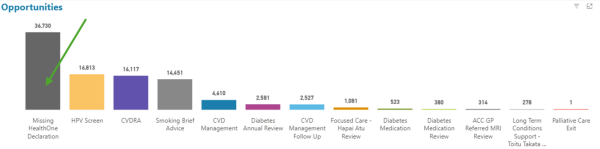
If you need some assistance on how this works, contact Glen at: thalamus.help@wellsouth.org.nz or glen.knol@wellsouth.org.nz.
WellSouth Update – 16 July-Hōngongoi 2025
Smoking brief advice - to see everyone in your practice that requires smoking brief advice, go to the Smoking Dashboard click on ‘No’ and then view patients
WellSouth Update – 3 July-Hōngongoi 2025
If you have patients who don’t meet the criteria for the hardship grant, you can see if they meet any other criteria for funding under the Opportunities Report (which is now its own report). It could be they are regular attendees and might be on Missed Opportunities (30 days), or a person coming in the next 30 days, so could be in the Appointment Opportunities (30 days).
Here is the link to the Opportunity Dashboard.
If you need some assistance on how this dashboard works, contact Glen at: thalamus.help@wellsouth.org.nz or glen.knol@wellsouth.org.nz.
WellSouth Update – 18 June-Pipiri 2025
We often get asked why is this person is on Thalamus when we believe they are not in our practice, or we can’t find them in the PMS? Thalamus is based on NES/Capitation, so if they are in Thalamus they are officially at your practice by our register records. Check your registration process if you have multiple practices, or if they have left the practice, make sure you have unenrolled them correctly (they will drop off Thalamus once they drop off the register)
WellSouth Update – 3 June-Pipiri 2025
Did you know there are Thalamus videos on the WellSouth website on things like how to use Excel? If you would like to listen to Glen’s dulcet tones, then watch the videos. You can also find links to them in the documentation for each report.
WellSouth Update - 21 May-Haratua 2025
If there is something you don’t know, or something that’s not right, we won’t necessarily know unless you tell us. So don’t be afraid to use the Feedback button or contact me via email
WellSouth Update – 7 May-Haratua 2025
To identify patients whose vaccination status is recorded in your practice but not in AIR (or vice versa), go to the Immunisation Dashboard, select the AIR Comparison tab, and drill down to view any mismatches between the two fully vaccinated groups.
WellSouth Update – 26 March-Poutū-te-rangi 2025
Glen says printing paper lists kills trees, is bad for the environment, and when left long enough is out of date! Excel is great for lists, filtering, and is quick, saving you time. Should you want to learn how to use Excel more effectively, feel free to contact us.
WellSouth Update – 12 March-Poutū-te-rangi 2025
Today's tip - If you can’t remember your Thalamus login, use the “forgot your password” link. Here's a link to a video tutorial if you'd like help navigating or resetting your password: Thalamus Password Reset